Labels

Showing posts with label Technical Stuff. Show all posts

Friday, 23 December 2016

Wednesday, 29 June 2016

About this blog page in brief

  • Founded on 16 June 2016
  • Short description:-
    This page is for discussion of problems related to desktops and laptops i.e. for all computers as well as some smartphones and tablets.
  • Long description :-
    The purpose of this page is to give technical support to people regarding troubleshooting of computer problems mainly software, and also to help getting tricks for some PC and Android applications to crack and use them.
  • Mission:-
    To give technical support to people regarding troubleshooting of computer problems mainly software, and help to get tricks for some pc and android applications to crack and use them.
  • Products:-
    Android Mobiles
    Android Tablets
    Android PCs
    Windows Mobiles
    Windows Tablets
    Windows PCs
    Apple smartphones (iPhones)
    Apple Tablets (iPad)
    Macbooks
    Ubuntu(linux) smartphones
    Ubuntu(linux) tablets
    Ubuntu PCs
    Chromebooks
  • Phone number:-
    NA
  • Email address:-
    acharyyashiladitya@gmail.com
  • Facebook:-
    NA

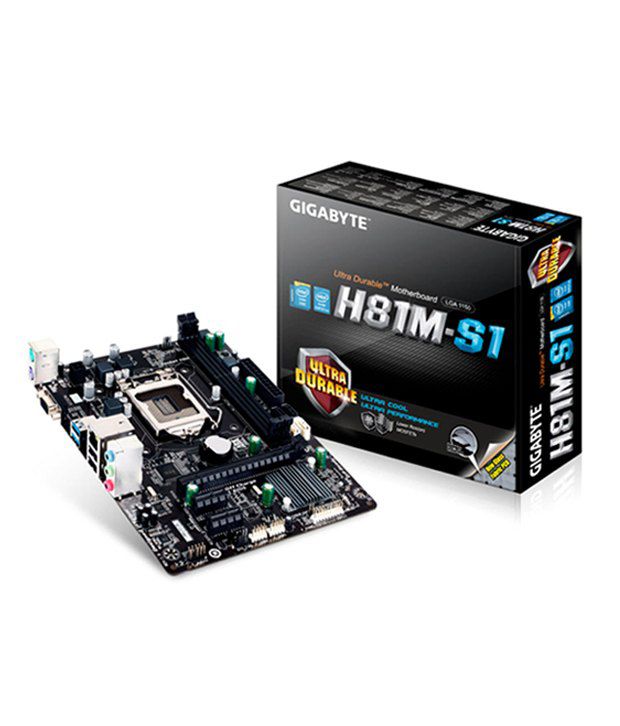
Some sample Motherboards

Tuesday, 28 June 2016

No one ever called a programmer "normal", ha ha.

‎

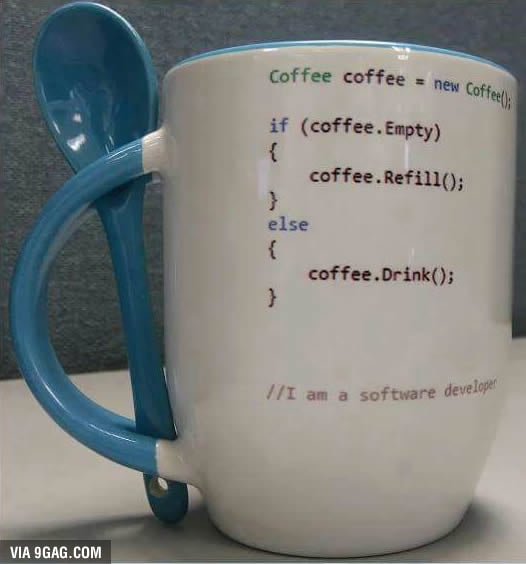
Special Christmas (X-mas) mug with JAVA code

I need this mug for Christmas!
9GAG Mobile App: www.9gag.com/mobile?ref=9fbp
http://9gag.com/gag/arK1vwd?ref=fbp


 Need this for Xmas

HOW TO MAKE SYMBOLS WITH KEYBOARD

HOW TO MAKE SYMBOLS WITH KEYBOARD

Alt + 0153..... ™... trademark symbol
Alt + 0169.... ©.... copyright symbol
Alt + 0174..... ®....registered trademark symbol
Alt + 0176 ...°......degre­e symbol
Alt + 0177 ...±....plus-or­-minus sign
Alt + 0182 ...¶.....paragraph mark
Alt + 0190 ...¾....fractio­n, three-fourths
Alt + 0215 ....×.....multi­plication sign
Alt + 0162...¢....the cent sign
Alt + 0161.....¡..... .upside down exclamation point
Alt + 0191.....¿..... ­upside down question mark
Alt + 1...........smiley face
Alt + 2 ......☻.....bla­ck smiley face
Alt + 15.....☼.....su­n
Alt + 12......♀.....f emale sign
Alt + 11.....♂......m­ale sign
Alt + 6.......♠.....s­pade
Alt + 5.......♣...... ­Club
Alt + 3............. ­Heart
Alt + 4.......♦...... ­Diamond
Alt + 13......♪.....e­ighth note
Alt + 14......♫...... ­beamed eighth note
Alt + 8721.... ∑.... N-ary summation (auto sum)
Alt + 251.....√.....s­quare root check mark
Alt + 8236.....∞..... ­infinity
Alt + 24.......↑..... ­up arrow
Alt + 25......↓...... ­down arrow
Alt + 26.....→.....ri­ght arrow
Alt + 27......←.....l­eft arrow
Alt + 18.....↕......u­p/down arrow
Alt + 29......↔... left right arrow

Share it with your friends so they know it too

Motherboard guide for Computer Hardware intermediates

Attention all computer hardware specialists:-
Here is the document which will guide you properly about a computer motherboard.

Computer Motherboard guide in general

This is the PDF manual containing guide about my 2001 desktop motherboard:-

PDF manual of my desktop motherboard (2001 model)

This is the picture of my laptop motherboard i.e. my laptop of 2011:-

http://www.laptopmainboard.com/hp_mainboard/hp-g6-1118tx-qb408pa.htm

Issues regarding old versions of Ubuntu

Those who have issues regarding Ubuntu old versions may visit this link:-

How to install or upgrade software from an unsupported version of ubuntu 

Playing Crysis on an old Pentium III

See an old computer from 1999 can run crysis which fails to run in newer computers. This is because to run high graphics games you need a dedicated graphics card with a GPU. If you have just enough RAM or fast processor but don't have powerful Graphics Card you won't be able to run High-end games.
Imagine this is a Pentium III 566MHz processor and has 384MB RAM.

Proof that old computers can (barely) run Crysis. This is a Pentium 3 system from 1999. The RAM and graphics card have been upgraded, and now it can run Crysis!

Knowing the details of Computer Virus, Worm and Trojan

Many of us suffer virus attacks. But we also heard about trojans and worms.
So, we need to know the difference between the 3. Here are the links:-

Computer Virus

Computer Worm

Trojan (Computing) 

Cooking with Intel !

      Actually a processor has a fan attached on it. If the fan is removed the processor becomes extremely hot, hot enough to cook food. So, it is a good idea of using your old dead processor as an electric oven or cooker.

Using a Pentium 4 processor to cook pasta!


Using a Pentium III processor for cooking!

Antivirus in PCs with Windows

For people who are using Windows desktops and laptops, it is very highly recommended that you use an antivirus or an antimalware program.
Kaspersky, Quickheal, McAfee, Eset Nod32, Norton, Bitdefender are the best. Avast is not that good.
If you have Windows vista,7, 8, 8.1 and 10 you may use the inbuilt antivirus programs like Windows Defender and Microsoft Security Essentials.
Whatever antivirus program you use you must update on a regular basis.
If you need an antivirus program, you can buy from a store offline or online, and if you need a cracked antivirus program for free, ask here what you need. The best help will be provided here.

Issues Regarding Motherboard ports


My dear friends,
If you want to buy an assembled desktop which is much better than a branded one you might go for good branded motherboards like Gigabyte, Asus, MSI, Intel, etc.
Whatever be the company of the Motherboard make sure to see whether the ports are directly soldered to the motherboard or not. These days we use a lot of ports. Most common is the USB port. You may also need PS2 ports, HDMI ports, VGA port for displays, RS232 (serial) ports, LAN or ethernet port, parallel ports, etc. Those who are high end gamers will look for Graphics Card ports (in AGP slot, PCI slot whatever). Whatever be your port requirements it is recommended to have ports which are not directly soldered to the mainboard (motherboard). This is because if you use a lot of periphrals like USB hard drives or pen drives, your ports after some monthes or years may malfunction. Now, if the ports are soldered you have to remove the soldering and again solder a new port. This is a quite hilarious task. On the other hand if your ports are not soldered direcly to the mainboard you can directly replace the port cards be it in PCI slot or other slots. The task will be much easier.

My motherboard from 2001 does not have any ports soldered to the mainboard except for a keyboard port which is an older AT-type older than PS2. All my ports like VGA, PS2(mouse), RS232(mouse), USB, Audio ports, etc. are in the form of port cards attached behind the cabinet of my CPU case. My USB ports were USB 1.1 with a very low speed. So, I added a new USB 2.0 card in PCI slot. It contains 4 USB 2.0 and 1 USB 3.0. Another PCI slot contains my ATI RADEON 9200 graphics card 128 MB. I also have 1 more empty PCI slot.

Sunday, 26 June 2016

Image editing using Photoshop

This is a picture of one of my grandmother who died recently. I have made the colour photo from the monochrome photo using adobe Photoshop cs6.
Photoshop is very easy to learn. Don't pay any money for learning photo shop.


Wednesday, 22 June 2016

BSOD or Blue Screen Of Death

BSOD or Blue Screen Of Death is a very Fatal Bad Error. They are different for Windows 95,98,ME and for Windows NT 4.0, 2000,XP,Vista,7 and also different for Windows 8,8.1 and 10.
Everyone who wants to make fun of windows go for it but whatever you do don't be one of the fools that laughs at BSOD's. Every time I see someone speak about a BSOD to insult windows and totally forgets about kernel panics in Linux, I die a little inside.
It's the same thing, except the bsod has a better interface for the error vs kernel panics.
Poor device drivers causes BSOD in Windows NT 4.0 ,2000, XP, Vista, 7 ,etc.
While BSODs can be due to software problems for the best of the rarest cases, it is the hardware problem in maximum cases. I had suffered BSODs in my laptop from July 2011, while attempting to install Windows XP from a CD with no generic SATA drivers and no option to disable the native SATA mode in BIOS because laptop BIOS settings are not customizable. I had to wait for about 2-3 years to get an XP CD with generic SATA drivers. I also had got BSOD in the same laptop while running VMWare with 3GB RAM allocated to it while my System had 4GB RAM, which I upgraded to 8GB now.
But till date my laptop is running fine for more than 4 years without any hardware issues.
I had also suffered BSODs in my Desktop from June 2001, yes more than 14 years old it was preloaded with Windows 98 and later dual booted with Windows XP. It had only 64MB RAM, and 866MHz Pentium III processor (whose clock speed is maximum 1.4GHz). A year before, I suffered BSOD while installing XP. I checked everything everywhere. I had 320MB RAM (256MB and 64MB). I checked renowned websites such as tomshardware and many more and finally I checked the RAM modules individuallly with Memtest CD and Windows Memory Diagnostic tool (available in Windows Vista, 7 and above) and found a lot of errors. I removed the 256MB module and rechecked and there were no errors. Finally, I could install XP, but XP is not good to run with 64MB RAM. So, I upgraded the RAM to 512MB (2x256MB) or sometimes I use 256MB (2x128MB) in case the 256MB RAM modules die out.
I also suffered BSODs several monthes after and discovered that the errors would be gone if I swap the hard drive PATA cables. So, I purchased a new PATA cable and now my Desktop is fine and healthy.


Tuesday, 21 June 2016

Tips to take care of your laptop

1. Use laptop keyboard very delicately, it is very sensitive being a keypad rather than a keyboard.
2. In case of heavyload works that require frequent pressing of enter keys and cursor control keys use an external keyboard that is meant for rough use.
3. If you are a heavy gamer who plays high end games on your notebook always plugin your charger in the laptop. Use an external keyboard.
I played Crysis 3 with battery ON and also with AC power and noticed significant improvement in game performance.
4. Never allow laptop batteries to charge continuously. This reduces battery backup in most cases. In case you work at home or at places where uninterrupted AC power is available remove battery and work on AC power.
5. For laptops which have optical drives use lens cleaner after every 10 hours of playback be it movies, music or softwares.
Note: Laptop optical drives on ejecting have their lens and laser exposed, so they require more care compared to desktop optical drives.
6. Keep your laptop over a book or a cooling pad in case your laptop gets overheated. Make sure laptop cooling vents are not blocked.
7. Cover your laptop with a towel, while you are not working. This protects your laptop from dirt.
8. Use updated antivirus software in case you install software in your laptop from a third party and you are connected to the web. Antivirus software is strictly recommended if you use any version of Microsoft Windows prior to Windows 8, be it Windows 7, Vista, XP, 2000, ME, 98, NT 4.0 or 95. This is because Windows 8, 8.1 and 10 have inbuilt malware protection.
9. If you still don't want to use antivirus use a Linux distribution such as Red Hat, Fedora or Ubuntu which you can dual boot with Windows.
10. If you have less than 3GB RAM use 32 bit OS.
11. If you want to upgrade your RAM or hard drive visit the website of your product manufacturer.
Use CPU-Z software to check your system specs in Windows. You will find every details including the no. of RAM slots you have. (Available in Useful Softwares)

12. Nowadays websites have too many ads which allow many softwares to be installed on your computer. Please check what softwares you are downloading or installing. Don't install any software without knowing.

Monday, 20 June 2016

The need of optical drives in Computers.

   I was discussing an issue related to laptops which were shipped without an optical drive. This person is my cousin who purchased a Macbook recently for a huge price approx.  and that too for an offer, 1,17,000 INR

Me: I own 2 memory cards of 16gb, 4 of 8gb, 1 of 4gb, and 2 pen drives of 8gb, as well as an external hard drive of size 500GB. Also I have 640GB HDD space in my laptop, and 120GB in my Desktop. But still I use DVDs and CDs for data backup. Why?
  Because they store data permanently, except CD-RW and DVD-RW discs. I also have the habit of collecting lot of PC games, softwares, operating systems and movies which I keep in my CDs and DVDs. CDs and DVDs are inexpensive and I have 6 CD bags. Also, still most of the softwares and movies are distributed in CDs and DVDs so people who dont have good Internet speed will still be using CDs and DVDs

Cousin: Unfortunately my new computer lacks a DVD drive and it is regarded as one of the finest in industry. However compromising functionality (lack of a DVD Drive, lack of a LAN port) for sake of beauty is something I really frown upon. The Mac also provides Thunderbolt ports that are much faster than USB ports.

Me: So what. That's not the problem. U can use an external USB DVD drive.

Cousin: After buying Mac laptop computer with such a high price if an external hard drive, CPU, USB, DVD-Drive, SMPS and even RAM has to be attached to it, then ultimately what did the Apple manufacture for such a huge price?

Me: Your Macbook is finest no doubt. Many notebooks don't come with optical drives but I see no problems if an external USB optical drive does the job.
   Finally optical drives are for those who dont have faster web connection and enough budget to purchase external usb hard drives.   Also in the past my desktop contained a floppy drive no optical drive now a drive has been attached. External blu ray DVD drives are still being sold and the sale has increased and is popular among the notebook users who don't have an optical drive. So it is not at all an issue. If all computers had internal optical drives what would be the purpose of an external optical drive?


Finally when both my cousin and I were together in a vacation, then I attached my LG DVD-RW drive on his Macbook Pro, it worked fine.The price external DVD writers are Rs.1400-Rs.4000 and the price of the external Blu-ray DVD writers range from Rs.4000-Rs.15000. 
External Blu-Ray DVD Writer
External LG DVD Writer (normal laser)
A sample Macbook Pro

Sunday, 19 June 2016

Use of a Lens cleaner

For all LAPTOP users

Many of us own laptops with optical drives (CD drives) and after a year or two the drives don't seem to read any discs.Why? Because when we eject the drives, it comes out along with the lens which is not the case for desktop optical drives. Lens cleaner is the best option in this case. My laptop's optical drive is still quite okay even after 4 years. I had few problems with this drive after 2.5 years not being able to read some discs. But after using WRITEX LENS CLEANER everything is quite okay.
                     Lens cleaner is also helpful for optical drives in DESKTOPS.